 Mia Khoirunisa
The landscape of digital content creation has seen a significant evolution with the release of Pikimov 5.1.0, which now offers a robust offline application. This development transitions Pikimov’s sophisticated browser-powered video editing and motion graphics capabilities from a web-based platform to a standalone desktop tool, eliminating the need for a constant internet connection. While the web version of Pikimov remains accessible for free indefinitely, users seeking the convenience and enhanced performance of the offline application can subscribe for $6 per month, with no long-term commitment required.
This release marks a pivotal moment for Pikimov, a project that, while not open-source, is characterized as a "beautiful labor of love" and a testament to the advancements in web technologies. The implications of this offline release are far-reaching, potentially positioning Pikimov as a viable alternative for users of established tools like CapCut, particularly for those with lighter editing needs or in environments where installing new software is restricted. Educational institutions, often equipped with Chromebooks or locked-down desktop systems, stand to benefit significantly from such a versatile and easily deployable solution.
From Browser Innovation to Desktop Powerhouse
Pikimov’s initial success was largely attributed to its accessibility and the power it packed into a web browser. The free, forever model for the browser version democratized access to advanced video editing and motion graphics tools. However, the inherent limitations of browser-based applications, such as reliance on internet connectivity and potential performance constraints, have always been present. The launch of Pikimov 5.1.0 as an offline app directly addresses these challenges, offering users a more stable, performant, and flexible editing experience.
The decision to offer an offline version at a modest monthly subscription fee underscores a strategic move to balance accessibility with sustainability. This "freemium" model, where a core offering is free and enhanced features or offline access are paid, is becoming increasingly common in the software industry. It allows developers to fund ongoing development and support while keeping the initial barrier to entry low. The $6 per month price point is competitive, especially when compared to the subscription costs of many professional-grade creative suites.
Targeted Use Cases and Broader Appeal
The developers highlight several key scenarios where the offline Pikimov application shines. For users with basic to intermediate video editing and motion graphics requirements, Pikimov could serve as a direct replacement for existing tools. Its lightweight nature makes it an attractive addition to the toolkit of professionals who might use it for quick edits or specific visual effects tasks. Furthermore, its compatibility with environments that restrict software installations, such as many educational settings and corporate networks, makes it a compelling option. The ability to download and install a fully functional application without requiring administrator privileges or network access simplifies deployment and usage considerably.
While Pikimov may not yet be positioned as a full-fledged replacement for industry-standard professional software for complex, high-end productions, its affordability and ease of use make it an excellent entry point for aspiring creators or those operating on a budget. The availability of a free trial period for the offline version encourages users to explore its capabilities and determine its suitability for their specific workflows, aligning with the philosophy of empowering creators with accessible tools.
Performance and User Experience in the Offline Environment
Initial user feedback from the Mac version of Pikimov 5.1.0 indicates a seamless integration, with users reporting that the experience feels akin to a native application rather than a browser window. This is a significant achievement, suggesting that the underlying browser technologies are effectively abstracted away, providing a distraction-free creative environment. The absence of browser overhead, such as tabs, bookmarks, and numerous other web-based distractions, contributes to a more focused workflow.
However, the current build does present a few limitations that are characteristic of early iterations of desktop applications built on web technologies. Notably, certain trackpad gestures, such as pinch-to-zoom, are not functional, and the ability to output the preview to a second monitor is absent. These are areas where native applications typically excel, leveraging the full capabilities of the operating system and hardware. The developers acknowledge these as potential areas for future improvement, and the fact that they are considered technically feasible bodes well for subsequent updates. The development being driven by a "one-person dev shop" makes these early accomplishments even more impressive.
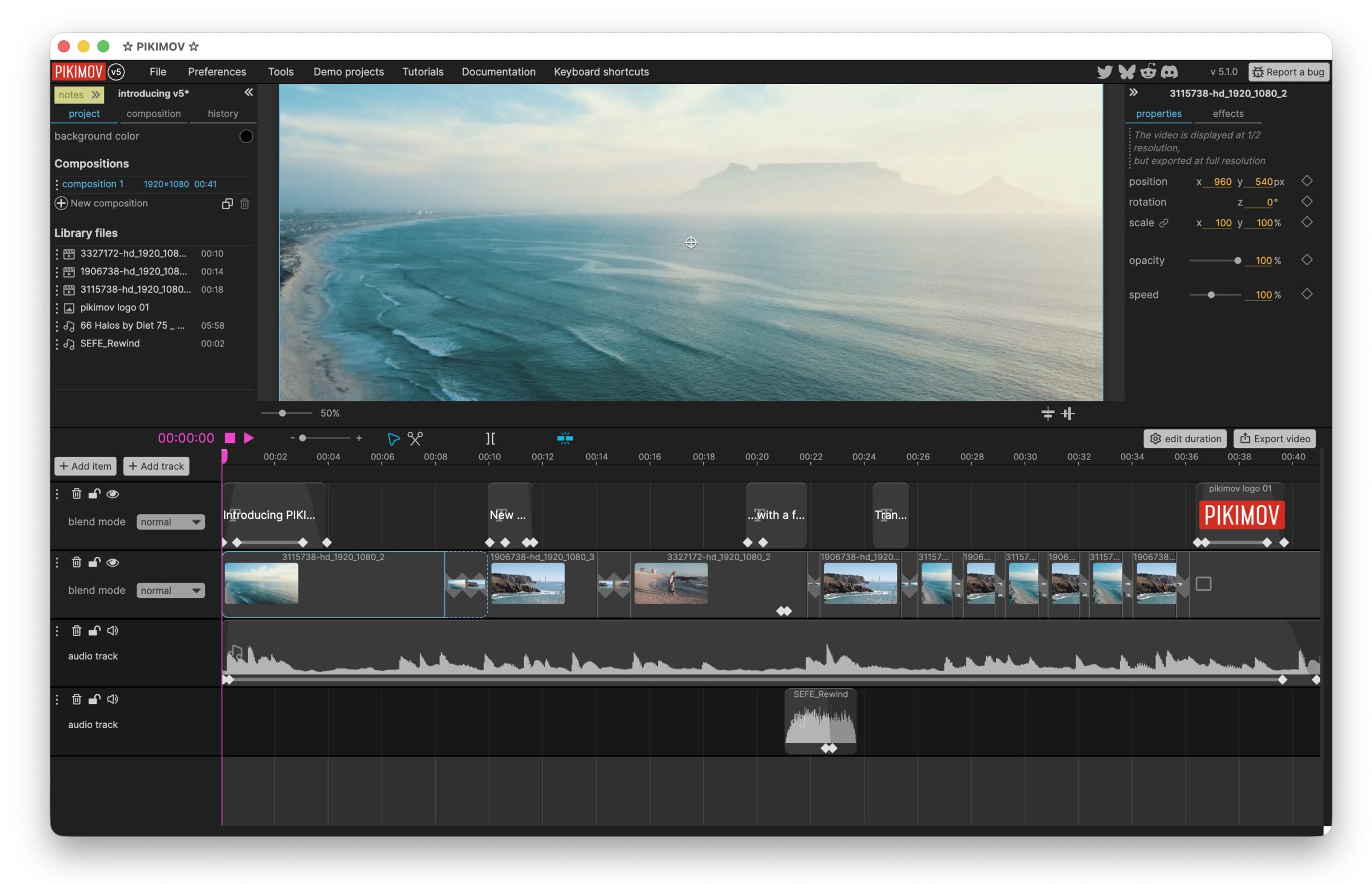
The core functionality of Pikimov, including its motion graphics and video editing features, remains accessible offline. The only exception currently identified is the background removal feature, which requires an internet connection to access an online model. Importantly, this feature is described as "read-only" for the model, meaning no user data is uploaded, mitigating privacy concerns. The developers have indicated that this dependency on an online model for background removal is a temporary measure, suggesting future updates may bring this functionality offline as well.
Expanding Platform Support and Community Demand
The demand for a Linux version of Pikimov is already substantial, with many users actively requesting its development. Given the often more restrictive software installation policies and the competitive landscape on Linux, a dedicated offline Pikimov application for this operating system would be particularly impactful. The developers have hinted that a Linux version is indeed in consideration, which would further broaden Pikimov’s reach.
For macOS users, a minor but crucial step is required for the 5.1.0 build to run without encountering security warnings. Due to macOS’s Gatekeeper security feature, applications downloaded from the internet are often flagged and require manual removal from quarantine. This involves executing a specific command in the Terminal: xattr -d com.apple.quarantine pikimov.app. While this is a one-time process per application, it is an essential step for users to bypass potential security restrictions and enjoy the full functionality of the application. The article notes that this process goes beyond the standard "right-click and open" or digging into system preferences, highlighting a specific technical hurdle for some users.
Future Development and Community Support
The roadmap for Pikimov includes the addition of a particle generator, a feature that will undoubtedly enhance its capabilities for motion graphics and visual effects. The success and continued development of Pikimov are intrinsically linked to user adoption and support. The call to action for users to purchase the offline version to "put Pikimov’s dev over the top" emphasizes the reliance on community funding for the project’s future growth. This direct appeal to users highlights the developer’s commitment and the potential for community engagement to shape the product’s evolution.
The article references previous coverage of Pikimov v5, indicating a consistent interest in the project’s progress. The inclusion of a tutorial video demonstrating compositing, layers, and compositions, as well as a general overview video, provides potential users with practical insights into the tool’s functionality and ease of use. These resources are invaluable for potential adopters looking to understand how Pikimov can integrate into their creative workflows.
A Compelling Addition to the Creator’s Toolkit
Pikimov, in its offline iteration, represents a significant step forward for accessible and powerful creative software. While it may not entirely replace the deep feature sets of high-end professional suites, its combination of affordability, ease of use, and impressive browser-powered capabilities makes it a highly attractive option for a broad spectrum of users. The transition from a purely web-based tool to a standalone application signifies a maturation of the technology and a commitment to providing a more robust and user-friendly experience.
The developers’ transparency regarding current limitations and future plans, coupled with the active engagement with user feedback, suggests a project with a clear vision and a dedication to iterative improvement. For individuals and institutions seeking a capable, cost-effective, and versatile solution for video editing and motion graphics, Pikimov 5.1.0 is a compelling proposition, offering a no-brainer addition to the modern creator’s digital toolkit. The opportunity to try it for free, both online and offline, allows users to experience firsthand the "pleasure to use" that the developers aim to deliver. The continued growth and feature expansion of Pikimov, especially with community support, will be keenly watched by the digital creative industry.
For more information and to explore the application, users are directed to the official website at https://pikimov.com. The provided links to tutorial videos offer valuable resources for those looking to get started or deepen their understanding of Pikimov’s capabilities.