 Mia Khoirunisa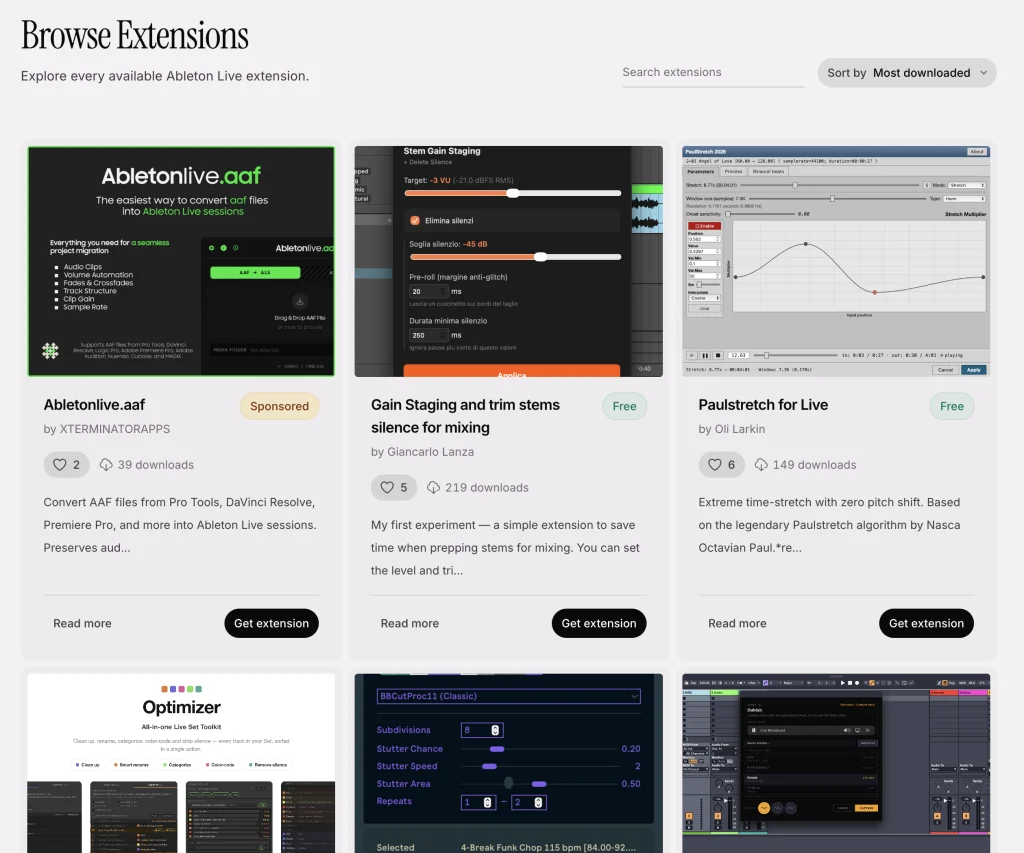
The recent public launch of the Ableton Extension SDK marks a significant evolutionary step for Ableton Live, empowering users to directly extend the DAW’s capabilities with custom scripts and functionalities. This new SDK, designed to allow deeper interaction with Live’s core features, has already seen an enthusiastic reception from the community, with a burgeoning ecosystem of practical and creative extensions appearing mere days after its release. This development promises to democratize further customization within Ableton Live, offering users powerful new avenues for workflow enhancement and sonic exploration.
A Rapidly Growing Ecosystem
Even in its nascent stages, the Ableton Extension SDK has fostered a vibrant community of developers and users. The immediate availability of numerous extensions indicates a strong user desire for such a tool, a sentiment echoed by the platform’s long-standing user base. This rapid proliferation of user-created content suggests a fertile ground for innovation, moving beyond the established capabilities of Max for Live.
Early adopters and content creators have been instrumental in cataloging and showcasing these new extensions. Akihiko Matsumoto, a prominent figure in the Ableton community, has meticulously compiled a comprehensive guide to the SDK, maintaining resources in both English and Japanese. His detailed walkthrough serves as a crucial entry point for newcomers, offering in-depth explanations and practical advice for navigating the new development landscape. The guide can be accessed at https://akihikomatsumoto.com/study/ableton-extensions-sdk.html.
Complementing Matsumoto’s technical deep-dive, Madeleine from Sonic Bloom has curated a video showcasing some of her personal favorite extensions available at launch. This visual guide provides a practical demonstration of how these new tools can be integrated into a user’s workflow. Her list, compiled shortly after the SDK’s debut, highlights the diverse range of functionalities already developed, including:
- Strip Silence: An utility designed to automatically remove silent sections from audio clips, streamlining editing processes.
- Assign Track Name to Clips: A functional script that automates the assignment of track names to associated audio or MIDI clips, aiding in project organization.
- AkStretch: An extension likely focused on advanced audio stretching and manipulation techniques.
- PaulStretch for Live: A port of the renowned PaulStretch algorithm, offering sophisticated time-stretching and granular synthesis capabilities within Live.
- Transition Tool: A utility aimed at facilitating smoother transitions between musical sections or clips.
- MLR Grid Slicer: A tool that appears to integrate grid-based slicing functionalities, potentially inspired by established sampling workflows.
- BBenCut: A script that likely offers precise audio cutting or editing features.
- Smart Batch Exporter: An extension designed to automate the process of exporting multiple tracks or clips with user-defined settings, significantly speeding up post-production workflows.
- Duplicate Tracks: A straightforward yet essential script for quickly duplicating entire tracks within a Live set.
- KeyPulse: A tool that may assist in generating rhythmic or melodic patterns based on key or pulse information.
- Chord Voicing Helper: An extension designed to assist users in constructing and exploring different chord voicings.
- Chord Progression Helper: A tool to aid in the creation and manipulation of chord progressions.
- Able-MCP: A script potentially offering enhanced control over Ableton’s Master Channel Processing or similar mixing functionalities.
- Ableton Score Editor: An ambitious extension aiming to bring score editing capabilities directly into the Ableton Live environment.
- Device Manager: A utility designed to streamline the organization and management of Ableton’s vast library of devices.
- Wavetable Sprite Lab: An extension that hints at innovative approaches to sound design, possibly involving wavetable synthesis and graphical manipulation.
These examples underscore the immediate impact of the SDK, demonstrating its utility across a spectrum of tasks, from essential workflow enhancements to more experimental creative tools.
Official Resources and Community Hubs
Ableton itself has provided initial support by maintaining the SDK documentation and offering a collection of sample extensions. While Ableton has stated they will focus on maintaining the SDK itself and not directly support user-created extensions, their provision of sample projects is crucial for developers. These samples, accessible through the official Ableton Extensions SDK page (https://www.ableton.com/en/live/extensions), serve as practical blueprints for aspiring developers. The platform’s launch page features an image carousel that not only highlights the SDK but also links to many of these early extensions, further consolidating resources.
Recognizing the need for a centralized community hub, akin to the established unofficial Max for Live repository, music artist vikära has launched https://liveextensions.co/. This platform aims to be a growing directory for Ableton Extensions, offering users a place to discover new tools and enabling developers to submit their own creations. The initiative is already proving valuable, featuring unique tools such as a radio sampler, showcasing the innovative spirit of the community.
The contributions of established figures in the music technology scene further validate the SDK’s potential. Kentaro, known for his innovative work with Ableton Live, has shared insights and demonstrations, including a camera-based extension and reflections on the development process, particularly referencing the use of AI coding assistants like Claude Code. His explorations, shared via platforms like YouTube, offer a glimpse into the creative possibilities unlocked by the SDK.
Understanding the Ableton Extension SDK: Key Distinctions and Implications
Background and Context:
The introduction of the Ableton Extension SDK arrives at a time when the demand for deep customization within Digital Audio Workstations (DAWs) is at an all-time high. For years, Ableton Live users have relied on Max for Live, a powerful visual programming environment, to create custom devices and M4L tools. However, the Extension SDK represents a distinct approach, focusing on script-based functionalities that integrate more directly with Live’s session and arrangement views, as well as its device ecosystem. This move can be seen as Ableton’s response to evolving user needs and the broader trend in software development towards more modular and extensible architectures. The development of the SDK also occurs in parallel with advancements in AI-powered coding tools, which are already impacting how developers approach software creation.
AI and Scripting Capabilities:
A common point of inquiry surrounding new scripting capabilities is their relationship with Artificial Intelligence. Ableton has clarified that the Extension SDK itself has no explicit AI components. However, the nature of scripting, particularly when utilizing languages like TypeScript and Node.js, inherently opens the door for AI-assisted development. TypeScript, with its extensive documentation and widespread adoption, is a popular choice for both manual coding and as a training data source for AI models. This means that generative AI tools can indeed be leveraged to produce Ableton Extensions. This capability has already been explored by some users, even prior to the SDK’s official release, through existing Python APIs, indicating a growing trend of AI integration in creative software development. The ability to use AI to generate code for Live extensions could significantly lower the barrier to entry for users who wish to create custom tools but lack traditional programming expertise.
Extension SDK vs. Max for Live:
A crucial distinction for Ableton Live users lies in understanding the different use cases and capabilities of the Extension SDK compared to Max for Live. Both require Ableton Live Suite for authoring and distribution, and both can leverage Node.js. However, their core functionalities differ significantly:
-
Ableton Extension SDK:
- Invocation: Extensions are typically accessed via a contextual menu item, allowing for quick execution of specific tasks.
- Interaction: They are designed to interact directly with Live’s devices, session view, arrangement view, and the file system.
- Interface: Extensions commonly utilize a Web view for their user interface, allowing for modern web technologies to be employed.
- Primary Role: Scripts for automation, workflow enhancement, and system-level interactions.
-
Max for Live:
- Invocation: Max for Live devices are loaded as instruments, MIDI effects, or audio effects within Live’s tracks.
- Interaction: While it offers deep interaction with Live through the Live Object Model (LOM), its primary focus is on real-time audio and MIDI processing.
- Interface: Max for Live can utilize native Live device interfaces or custom windows, which can also incorporate Web views.
- Primary Role: Creation of synthesizers, effects, MIDI and audio processors, as well as Generators and Transformations within the clip view.
In essence, Max for Live excels at creating devices that manipulate audio and MIDI signals in real-time, functioning within the signal flow of Live. The Extension SDK, conversely, focuses on providing scripts that automate tasks, modify project elements, and interact with Live’s structure and environment outside of the direct audio signal path. While there are overlapping areas, particularly with Max for Live’s clip view transformations and generators, the fundamental difference lies in their primary purpose: real-time processing versus task automation and structural manipulation.
Future Trajectory and User Expectations:
The introduction of the Extension SDK is likely to foster greater consistency in how hardware and software interact with Live. The current landscape, where different use cases often necessitate distinct API interactions, presents a challenge. As both the Extension SDK and Max for Live mature, it is anticipated that areas of overlap will evolve, potentially leading to more unified development paradigms.
The immediate outpouring of community support and the rapid development of extensions suggest a strong user desire for this level of customization. This democratizes the creation of powerful tools, allowing users to tailor Ableton Live precisely to their individual workflows and creative needs. The long-term implications include a more adaptable and powerful Ableton Live ecosystem, driven by the ingenuity of its user base. Ableton’s strategic decision to provide the SDK, while not directly supporting extensions, positions them to benefit from this innovation without the burden of extensive third-party support.
The availability of resources like Akihiko Matsumoto’s guide and Madeleine’s video, alongside community-driven platforms like liveextensions.co, are crucial for onboarding new developers and users. The success of this initiative hinges on continued community engagement and the development of robust, well-documented extensions. As the SDK evolves, it will be fascinating to observe how it shapes the future of music production within Ableton Live, potentially setting new benchmarks for DAW extensibility. The question of whether users will contribute to hand-coding guides or explore further AI assistance remains an open and exciting avenue for future discussion and development within the Ableton community.