 Mia Khoirunisa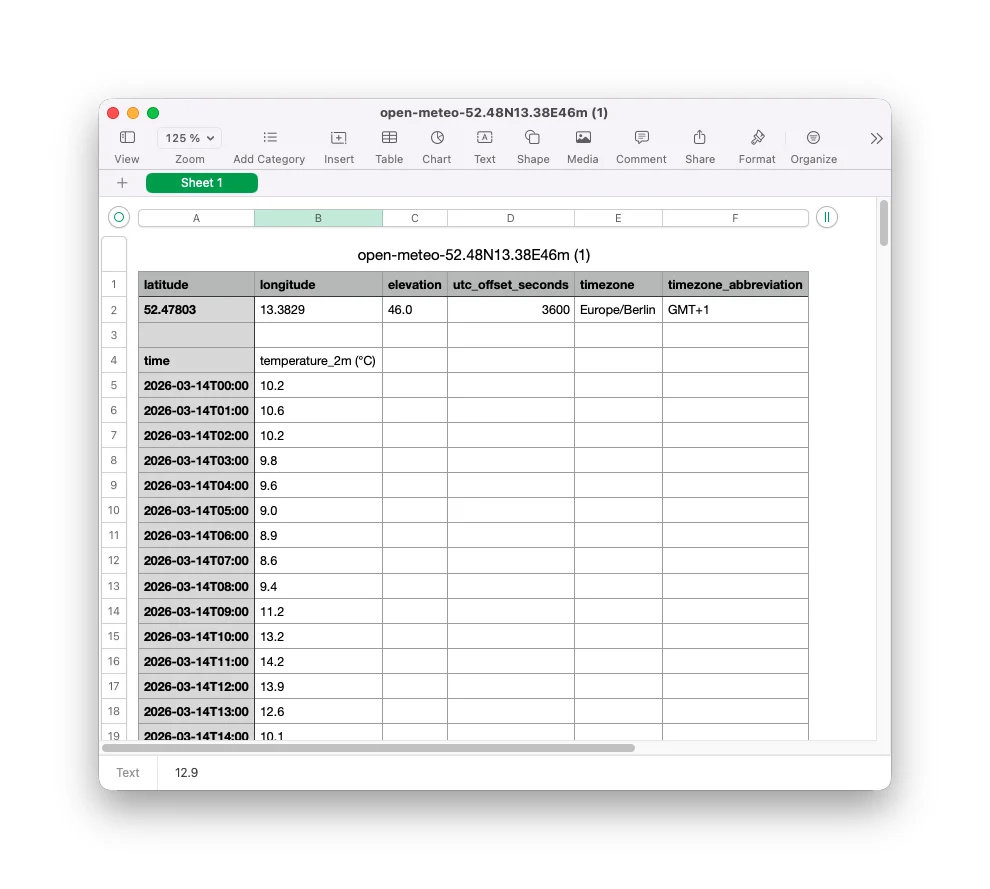
The intersection of data and music production has never been more accessible, thanks to innovative tools that bridge the gap between raw information and creative expression. Manifest Audio’s latest offering, Datafree, is a prime example of this burgeoning field, empowering Ableton Live 12 users to transform any numerical data into compelling musical elements. This free tool, available for a pay-what-you-will donation with proceeds benefiting World Central Kitchen, leverages the new MIDI Generative Tools introduced in Ableton Live 12, opening up a new frontier for sonic exploration.
The significance of Datafree lies in its ability to harness the latent musicality within datasets, a concept known as data sonification. Noah Pred, the visionary behind Manifest Audio, has long been a proponent of this practice, advocating for the creative potential of using numbers and information as a musical source. Datafree, by integrating seamlessly into Ableton Live’s Clip view, provides an intuitive entry point for both novice and experienced producers to experiment with this transformative approach.
The Evolution of MIDI Tools in Ableton Live 12
The release of Ableton Live 12 marked a pivotal moment for MIDI manipulation within the digital audio workstation (DAW). A key innovation was the introduction of the Clips window, which now accommodates a suite of MIDI Generative Tools and MIDI Transformation Tools. This expansion allows users to generate entirely new MIDI material or modify existing patterns directly within the Clip environment, without the need to start from a blank slate. Furthermore, the integration with Max for Live enables developers to create an ever-expanding ecosystem of custom MIDI Tools, further democratizing advanced MIDI processing.
While the potential of these new tools was immediately apparent to some, many users and Max for Live developers, according to reports, initially overlooked the depth and creative possibilities they offered. Noah Pred of Manifest Audio, however, recognized this untapped potential early on. He has since become a prolific contributor to the third-party MIDI Tools landscape, producing a collection of innovative plugins that have garnered significant praise. Datafree stands as a testament to his commitment to exploring and expanding the capabilities of these new features.
Data Sonification: A Deeper Dive
The practice of data sonification, the process of translating data into sound, has a rich history across various scientific and artistic disciplines. It offers a unique way to perceive patterns, anomalies, and trends that might otherwise remain hidden within complex datasets. For musicians, data sonification provides a novel source of inspiration, transforming abstract information into tangible sonic textures, melodic lines, and rhythmic structures.
Pred’s work with Manifest Audio has consistently aimed to demystify and democratize data sonification. His guides and tools provide accessible pathways for artists to incorporate data-driven elements into their music. Datafree, in this context, serves as a gateway drug to the broader world of sonification, offering a simple yet powerful introduction to the concept. By allowing users to paste raw numbers directly into an Ableton Live Clip, it removes technical barriers and encourages immediate experimentation.
Getting Started with Datafree: A Practical Walkthrough
The process of using Datafree is remarkably straightforward, making it an ideal tool for beginners interested in data sonification. The core requirement is simply a set of numerical data. For this demonstration, we will leverage freely accessible climate data, transforming meteorological information into musical melodies.
Step 1: Acquiring Datafree
To begin, users need to download Datafree from the Manifest Audio website. The tool is offered on a pay-what-you-will basis, with all contributions directed towards World Central Kitchen, an organization dedicated to providing food relief in times of crisis. After providing an email address, users can access the download.
Step 2: Installing Datafree in Ableton Live
Datafree, being a Max for Live MIDI Tool, requires installation within Ableton Live’s User Library. Attempting to drag the .amxd file directly into a project will result in an error. Instead, the file should be navigated to and placed within the following directory structure: User Library > MIDI Tools > Generators. This ensures that Datafree is recognized as a generator within Live’s MIDI Tool ecosystem.
Step 3: Accessing Datafree in Live 12
Once correctly installed, Datafree will appear as an option within any new Live MIDI Clip. When a MIDI Clip is opened, users will find the MIDI Generative Tools located on the right-hand side of the Clip view. Clicking on this section will reveal MFA Datafree as a selectable option.
Step 4: Sourcing Weather Data with Open-Meteo
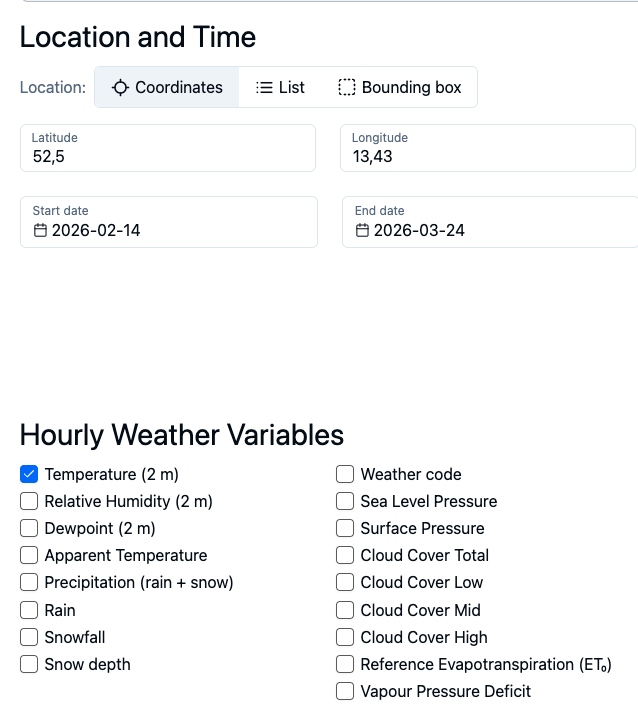
The next crucial step is to acquire the numerical data that will be sonified. While weather data has become increasingly privatized, presenting challenges for accessibility, platforms like Open-Meteo offer a solution. Open-Meteo is an open-source API that provides access to an extensive repository of meteorological data from around the globe, reportedly housing approximately 90 terabytes of information. For non-commercial use, it is entirely free, and its web interface requires no coding expertise.
The Historical Weather API provided by Open-Meteo offers a user-friendly graphical interface for data retrieval. Users can select specific locations, timeframes, and data parameters. For this tutorial, we will focus on historical temperature data. The platform can often automatically detect the user’s location, or latitude and longitude can be manually input via various online resources like latlong.net.
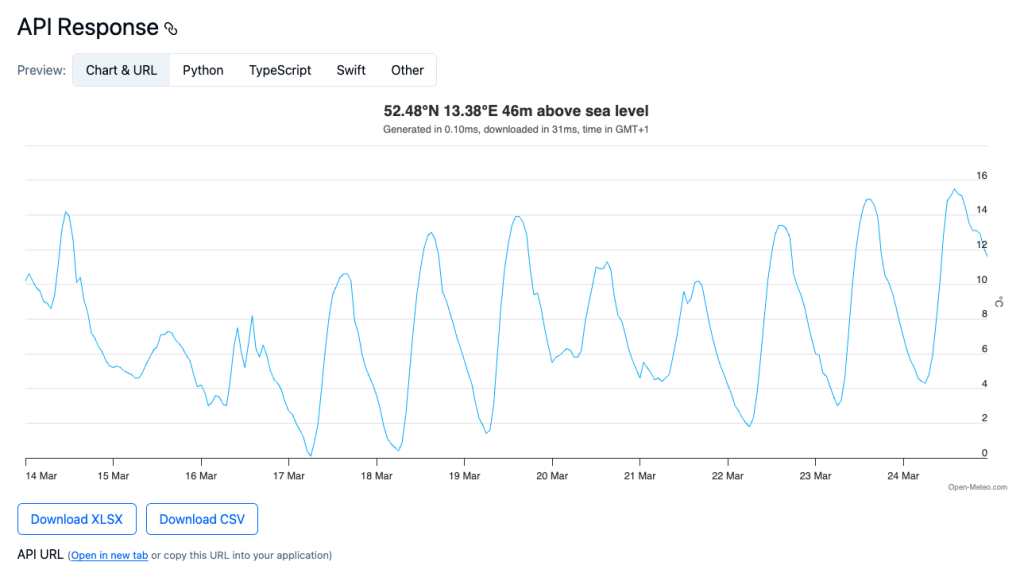
Datafree is designed to handle a maximum of 256 data points. This limit is advantageous as it corresponds to just under eleven days of hourly data, providing a manageable yet substantial dataset for musical generation. After selecting the desired parameters, users can refresh the results to view a graphical representation of the data.
Step 5: Extracting Raw Data
While the graphical representation is informative, the true power for sonification lies in the raw numerical data. Open-Meteo allows users to download this data as a CSV (Comma Separated Values) file. This file contains the numerical values that Datafree will interpret.
Step 6: Preparing Data for Pasting
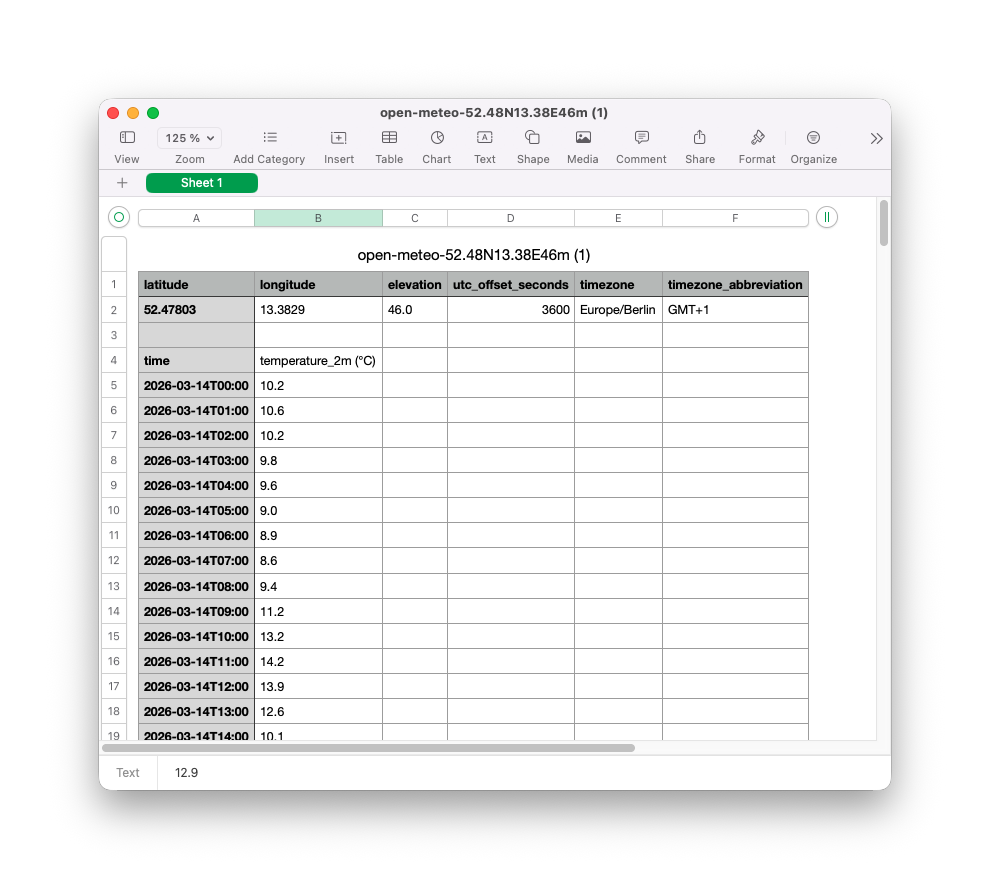
Datafree is designed to work with simple numerical lists and does not parse complex characters like commas directly within the pasted data. Therefore, the most efficient way to prepare the data is to open the downloaded CSV file in a spreadsheet application. Any standard spreadsheet software, such as Apple Numbers, Microsoft Excel, or Google Sheets, will suffice.
Within the spreadsheet, users should select up to 256 rows of the desired numerical data. The next step is to copy this selected data.
Step 7: Generating Music with Datafree
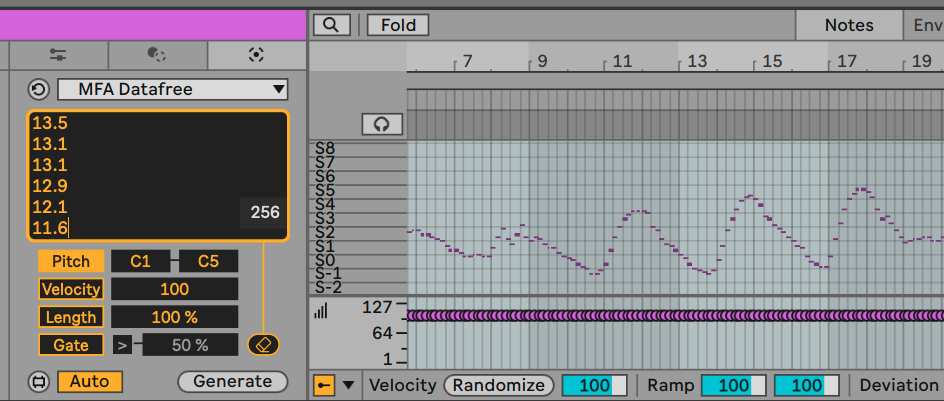
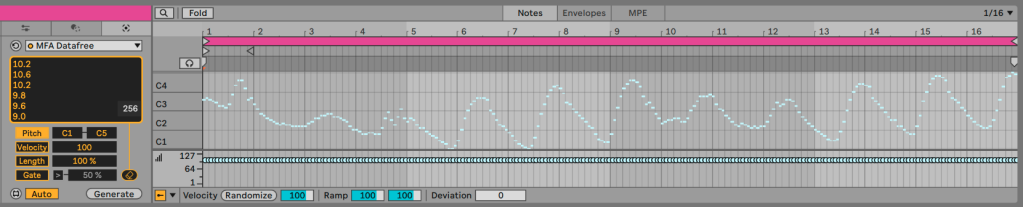
With the numerical data copied, the user can now return to Ableton Live and paste it into the Datafree tool within the MIDI Clip. Datafree will then display a visual representation of the pasted data, which should closely resemble the graph generated by Open-Meteo.
Users can then specify a desired pitch range for the generated MIDI notes. After setting the pitch range, clicking the "Generate" button will transform the numerical data into MIDI notes within the Ableton Live Clip.
Exploring Sonic Possibilities: Beyond Standard Pitches
The beauty of data sonification lies in its flexibility. The generated MIDI notes are not restricted to a standard 12-tone equal temperament scale. Users can explore various tuning systems or even map the data to other parameters within their DAW or virtual instruments.
In the example provided, the author chose to select a specific Tuning System, "Pelog 7 Tones TBN!" This choice alters the perceived pitch relationships of the generated notes. To fully appreciate these microtonal nuances, an Ableton Live device or external plugin that supports per-note pitch manipulation, such as through MPE (MIDI Polyphonic Expression), is necessary. The author utilized AAS Multiphonics CV-3 in conjunction with Sinevibes Hollow reverb, demonstrating how even a mono signal can reveal the tuning system’s character when Multiphonics is set to polyphonic mode.
The result is a melody derived from the last ten days of March’s temperature data, offering a unique sonic interpretation of meteorological patterns. This opens up a world of possibilities, from the author’s playful suggestion of sonifying pollen counts to more complex analyses of environmental or financial data.
The Broader Landscape of Data Sonification Tools
Datafree serves as an excellent introduction, but Manifest Audio offers a more comprehensive suite of Sonification Tools for those seeking advanced features. This expanded collection includes an enhanced version of the generative tool and introduces advanced controls for rate and probability sonification, particularly within their Data MIDI and Data Mod tools. The recent v2.2 update for Sonification Tools further bolsters these capabilities, offering more granular control over how data translates into sonic elements.
The trend of data sonification is not limited to Ableton Live or Manifest Audio. Similar innovative approaches are emerging across the music technology landscape. For instance, Benn Jordan recently developed a module for VCV Rack that sonifies stock market data, highlighting the cross-platform appeal and versatility of this creative approach.
Historically, artists have explored the connection between data and music. Johannes Kreidler’s classic mash-up of stock market data and Microsoft Songsmith, which chronicled the 2008 market collapse, serves as a poignant example of data sonification as a form of artistic commentary and historical documentation. These endeavors underscore the power of data sonification to not only create unique musical experiences but also to offer new perspectives on complex information.
Implications and Future Directions
The accessibility of tools like Datafree has significant implications for music education, artistic innovation, and even scientific communication. By lowering the barrier to entry for data sonification, these tools empower a wider range of individuals to engage with data in a more intuitive and creative manner. This can foster a deeper understanding of complex datasets and inspire new forms of artistic expression.
The ongoing development of MIDI Generative Tools in DAWs like Ableton Live 12, coupled with the innovation from third-party developers like Manifest Audio, signals a future where the boundaries between data analysis and creative sound design become increasingly blurred. As more datasets become available and more intuitive tools are developed, we can anticipate a surge in data-driven music, offering novel ways to perceive and interact with the world around us. The ability to transform something as ubiquitous as weather patterns into a personal melody exemplifies the profound creative potential that lies dormant within the raw data that shapes our lives.